Consistent scalp photography
Compare your scalp photographs over time — not your camera angle.
GraftView guides you back to the same scalp view, angle and distance each time, reads the light, and then checks whether two photographs are reliable enough to compare.


Capture works offlineYou decide who sees your recordNot a medical device
The problem
The same scalp looks different in every photograph.
Angle, distance, light, wet or dry hair, hair length — change one and the same scalp looks better or worse with nothing about it having changed. That is why a camera roll of progress photographs is so hard to read, and why a clinician can do so little with one.
Measured by the app at the moment of capture
- Angle
- Distance
- Light
- Sharpness
Left to you — and named, so you know
- Background
- Hair length
- Wet or dry
- Styling
How it works
Three steps. The camera does the hard one.
Line up, check, compare. Each step is its own screen in the app, and none of them lets a photograph through that the next one cannot use.
Step 1 · Line up
Your last photograph of this view appears over the live camera. You move until the two agree, and the shutter fires.
Line up — the previous photograph over the live camera.
Step 2 · Check
Every photograph is checked on its own first — sharp enough, lit enough, the right view. If not, the app says so and offers a retake.
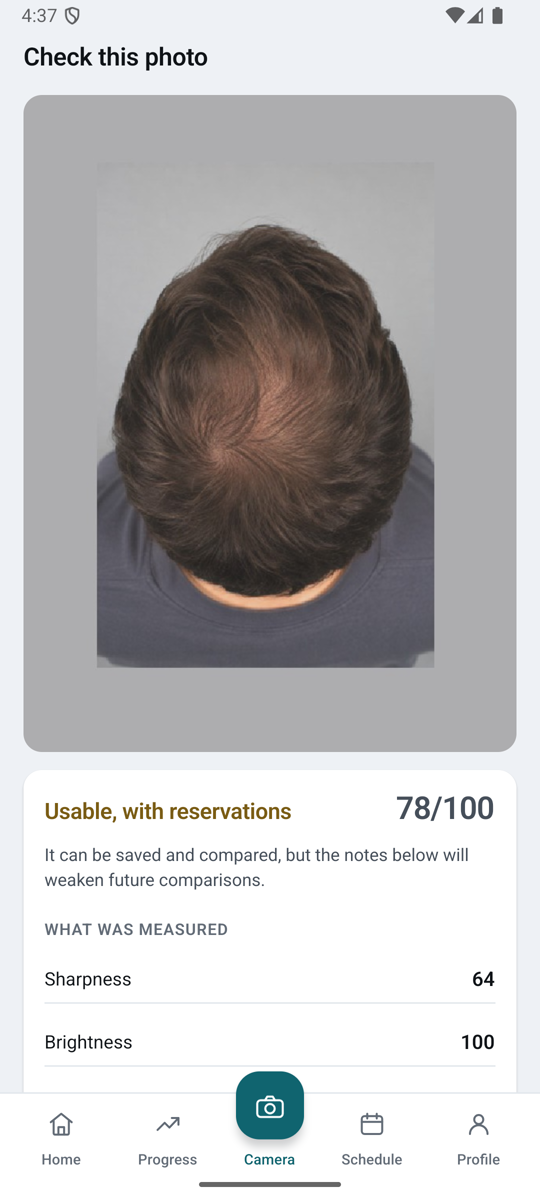
Check — each photograph scored on its own.
Step 3 · Compare
Pick any two photographs of the same view. The app scores whether that pair can be compared, and only then describes, cautiously, what looks different.
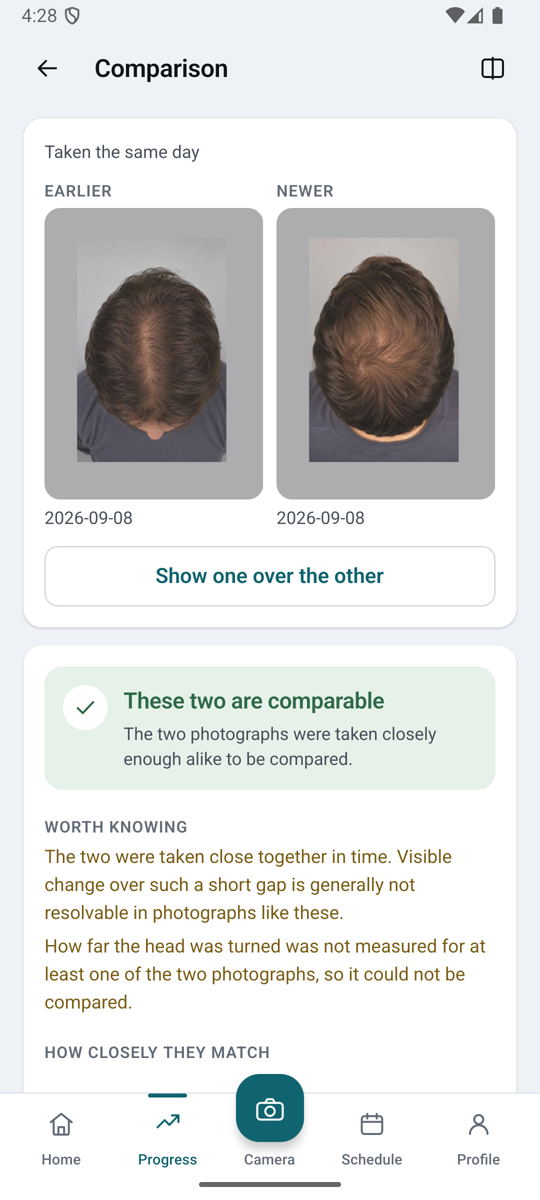
Compare — the pair is scored before anything is described.
Screens from the app, with a synthetic demonstration profile. No real person.
- 1/4
Your last photograph appears
Translucent, over the live camera, so you can see where you were.
- 2/4
You move until the two agree
Angle and distance are read continuously and shown as numbers, not as a feeling.
- 3/4
The frame confirms what it can measure
Angle, distance and light. It does not claim to judge anything it cannot measure.
- 4/4
The shutter fires
One photograph, taken the way the last one was.
Comparison
Before anything is compared, the pair is checked.
Two photographs of the same head, taken a month apart from slightly different positions, can look better or worse for reasons that have nothing to do with hair. So GraftView scores the pair first — and when it does not pass, it says so and stops.
Two separate scores
Capture quality
Is this one photograph usable at all?
Comparison quality
Can these two photographs be compared with each other?
ComparableCrown
In the app: a pair that passed, and what was measured.
Comparison quality Comparable roll 0.4° · scale 1.01× · same view
Same view, same angle, same distance. This pair can be described.
Not comparableCrown
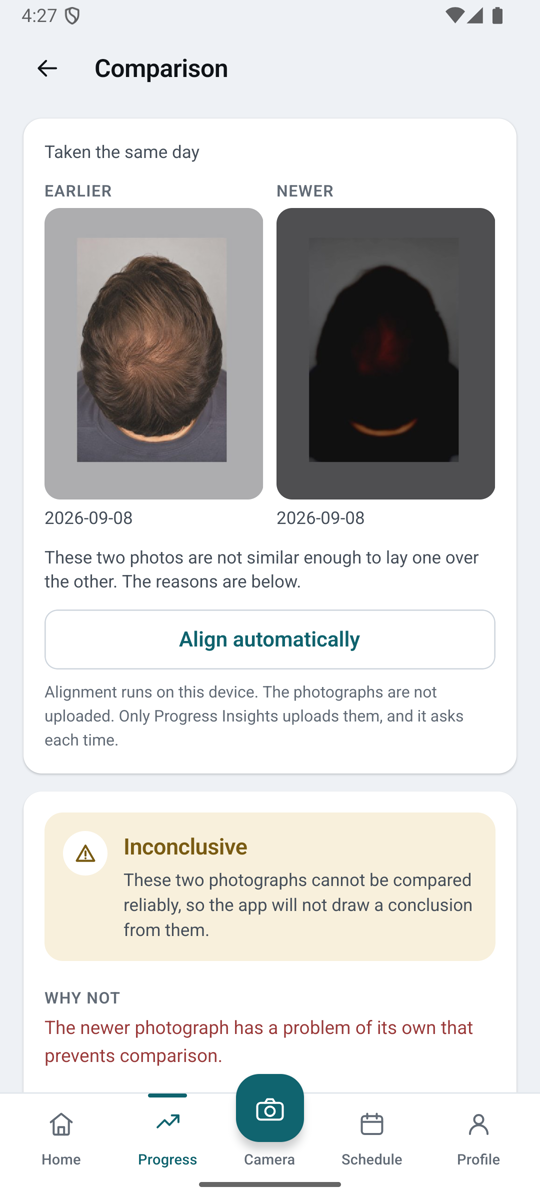
In the app: a pair that did not, and why.
Comparison quality Not comparable roll 12.0° · scale 1.16× · same view
Each photograph is usable on its own. Turned 12° and taken closer, the pair is not — so nothing is described.
Based on these photographs and the conditions they were taken in. Not a medical device.
Your history
A history that survives your next phone.
Photographs are kept in your account, so a new phone picks up where the old one left off. Capture works with no network at all — the shutter never waits for a connection, and what you took uploads when there is one.
Pick any two sessions of the same view. The app puts them side by side and tells you whether they are comparable before it describes anything.
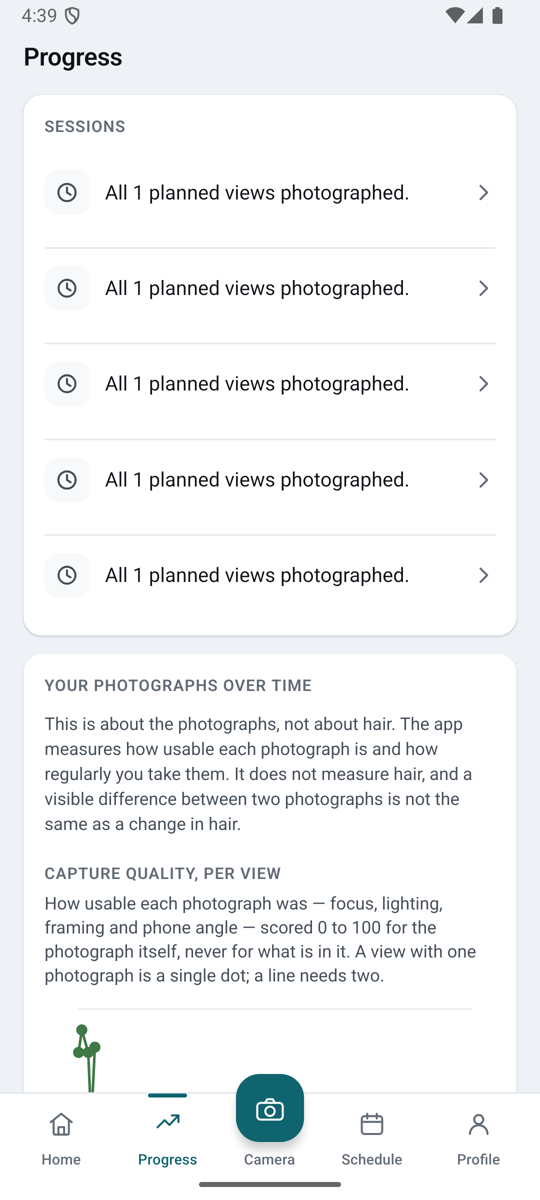
In the app: sessions by view, on a synthetic profile.
Who it is for
After a hair transplant
The earliest photographs are the ones that cannot be taken later. Take them the same way from the first week, and every photograph after that lines up with them.
A photo record you can trust
Repeatable photographs of the same scalp view, month after month, without guessing where the phone was last time.
A tidy history for your clinician
Instead of scrolling a camera roll at the appointment, give your clinic access to your record — the photographs and the conditions they were taken in.
Clinic sharing
Share your record with your clinic — if you want to.
The screen that asks lists exactly what the clinic will be able to see, and that list is the agreement. You can end it at any time.
- 1/4
No clinic access
Photographs live in your account. The record is locked, and no clinic has a way in by default.
- 2/4
You grant access to one named clinic
The lock opens and the record appears on the clinic panel. The screen that asked lists what the grant covers — that list is the agreement.
- 3/4
You ask, your clinician replies
A question and its answer sit beside the same photographs, so nothing is discussed out of context.
- 4/4
You end access whenever you want
The lock closes and the record leaves the clinic panel. The clinic no longer sees new updates.
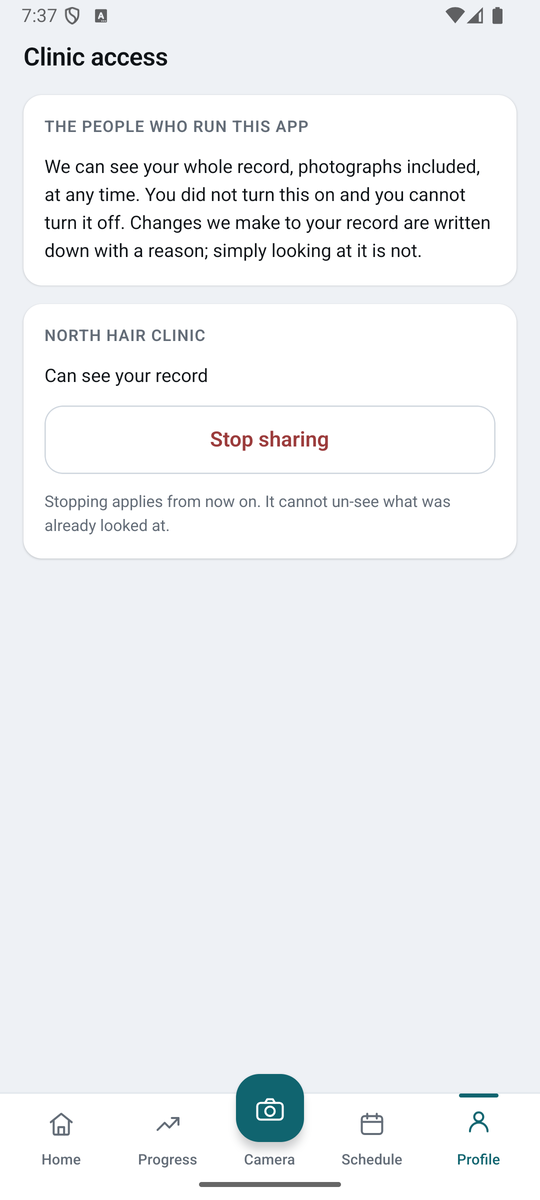
In the app: the grant screen lists exactly what the clinic will see.
Clinic communication
Share the record. Ask your clinician.
Share selected photographs and comparisons with your clinic, then discuss them in the context of the same record. You control what is shared and can end access.
- Share selected records
- Ask a question in context
- Keep photographs and replies together
- End access when you choose
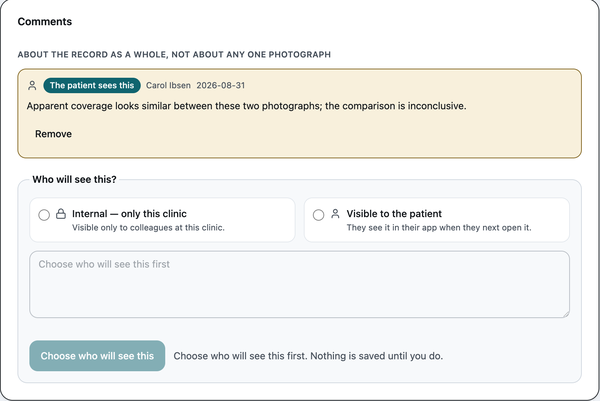
In the clinic panel: a clinician’s reply, kept with the record it is about.
Privacy
Photographs of your scalp are personal data. They are handled that way.
Held against your account. Not sold, and never used for advertising.
No analytics of any kind run on image content.
Deleting a capture deletes the server copy, not only the one on your phone.
This website loads nothing from anyone else — no analytics, no pixel, no font service.
Operated by a named individual, not a marketing company. The person who wrote the privacy policy answers the support address.
Questions
What it does, what it costs, what it will not tell you.
Is GraftView available now, and what does it cost?
Yes — on the App Store and on Google Play. Current pricing is shown in the store listing, and the two buttons on this page lead straight to it.
Do I need an account?
Yes, so that your history is kept somewhere other than one phone. You sign in with a code sent to your email address.
What happens when I delete something?
Deleting a capture deletes the server copy as well as the one on your phone. You can delete a capture, a session, a profile, or close the account.
Does it work without a connection?
Taking photographs does. The shutter never waits for the network; what you took uploads when there is one. The written description of what looks different between two photographs is produced on our server, so that step needs a connection.
How does sharing with a clinic work?
You grant access to one named clinic, and the screen that asks lists exactly what the grant covers — that list is the agreement. Only a clinician assigned to you can open the record, you can ask them a question beside it, and ending the grant stops any further access from that moment on.
What does GraftView not do?
It describes photographs, not hair. It does not name a condition, count anything, put a number on density, place you on any scale, suggest a treatment or predict an outcome. Coverage, density and length are different things and are kept separate. Nothing here replaces a clinician — if something concerns you, consult a qualified healthcare professional.
What does "not comparable" mean?
That the two photographs differ in angle, distance, light or view by more than the app can account for, so any description would be unreliable. It tells you which, and the answer is to take the view again the way the earlier one was taken.
Which scalp views does it photograph?
Several fixed views — crown, top and frontal hairline among them — and each is kept separate. A crown photograph is only ever placed beside another crown photograph.
iPhone or Android?
Both. The same account works on either, and your history follows the account rather than the phone.
Get the app
Start with the photograph you take today.
The photographs that matter most are the earliest ones, and they cannot be taken later. GraftView is on the App Store and Google Play.
Apple, the Apple logo and App Store are trademarks of Apple Inc., registered in the U.S. and other countries. Google Play and the Google Play logo are trademarks of Google LLC.